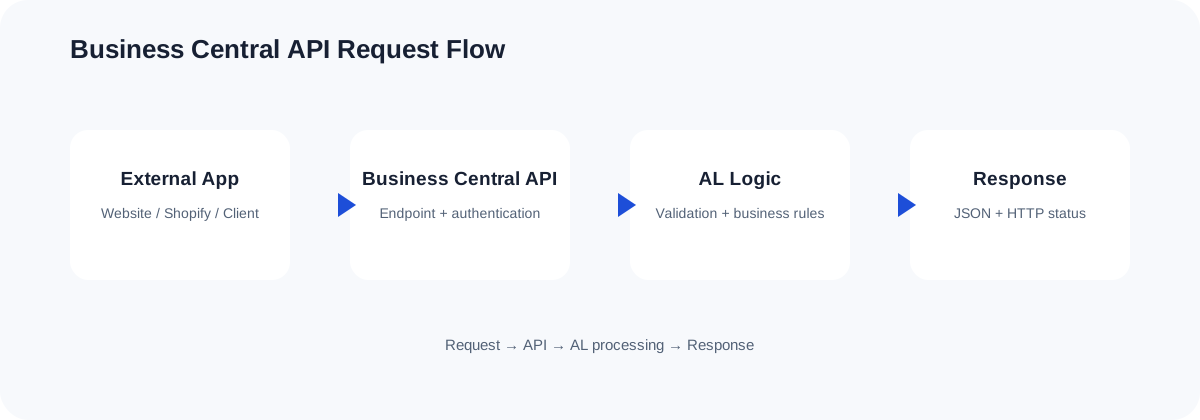
How the API flow works
The Challenge of Integration Error Handling in AL
Building integrations in Dynamics 365 Business Central is a core requirement for modern cloud ecosystems. However, consuming third-party APIs using AL's native HttpClient introduces a complex layer of failure points. In a production environment, integrations fail for dozens of reasons: DNS resolution failures, transient network drops, rate limiting (HTTP 429), expired authorization tokens, or malformed payloads returning HTTP 400 Bad Request.
If your AL code does not gracefully implement business central api error handling, these failures manifest as unhandled runtime exceptions. For interactive users, this causes unexpected screen crashes, uncommitted database transactions, and data inconsistency. For background processes like Job Queue tasks, unhandled errors immediately put the job in an 'Error' state, stalling critical business workflows. To build resilient integrations, you must master defensive AL API error handling patterns.
The Multi-Layered Architecture of an API Request
To implement proper error handling, you must understand that an outbound HTTP request can fail at several distinct stages. An effective AL implementation tests and responds to errors at each layer of this execution lifecycle:
- The Transport/Network Layer: The physical connection to the remote endpoint. If the server is offline, the DNS cannot be resolved, or the SSL handshake fails,
HttpClient.Sendreturns a booleanfalse. No HTTP status code is generated because no connection was established. - The HTTP Protocol Layer: The server receives the request and returns a response, but the HTTP status code indicates a failure (e.g., 401 Unauthorized, 404 Not Found, 429 Too Many Requests, or 503 Service Unavailable).
- The Application Layer: The response returns a successful HTTP status code (such as 200 OK or 201 Created), but the JSON payload contains domain-level errors, validation issues, or unexpected data structures.
- The AL Database Layer: The external call is successful, but inserting or modifying records inside Business Central fails due to locks, validation rules, or database constraints, triggering a rollback.
The Outbound API Transaction Dilemma
One of the most dangerous anti-patterns in AL development is mixing write transactions with external HTTP requests. Under Business Central's transactional integrity rules, if a database write has occurred in the active transaction, and a subsequent HTTP request fails (triggering an Error() statement), Business Central rolls back the database changes.
However, if the HTTP request was *successful* and modified state on the remote server, but a subsequent local AL process failed, Business Central rolls back the local database, leaving the two systems completely out of sync. This is known as a "split-brain" state.
To avoid this, always follow these rules:
- Perform HTTP operations *before* writing to the database, or isolated within separate transactions.
- Use
Commit()before initiating an HTTP request if you must save local data first. Note that callingCommit()inside an active page session can block database tables, so utilize background tasks or the Job Queue for extensive processes. - Implement transactional safe guards or staging tables to record integration state before transmission.
Complete Implementation: A Resilient HTTP Client Wrapper
Below is a production-grade AL codeunit that demonstrates best practices for managing HttpClient errors and parsing standard REST API errors. It demonstrates proper transport-level error checking, HTTP status code evaluation, and RFC 7807 problem detail parsing.
codeunit 50120 "API Integration Manager"
{
    Access = Public;

    procedure SendPostRequest(TargetUrl: Text; Payload: Text) ResponsePayload: Text
    var
        Client: HttpClient;
        Request: HttpRequestMessage;
        Response: HttpResponseMessage;
        Content: HttpContent;
        Headers: HttpHeaders;
    begin
        // Setup request properties
        Request.SetRequestUri(TargetUrl);
        Request.Method := 'POST';

        // Set content and content headers
        Content.WriteFrom(Payload);
        Content.GetHeaders(Headers);
        if Headers.Contains('Content-Type') then
            Headers.Remove('Content-Type');
        Headers.Add('Content-Type', 'application/json');
        Request.Content := Content;

        // 1. Transport Layer Error Handling
        if not Client.Send(Request, Response) then
            HandleTransportFailure(TargetUrl);

        // 2. Protocol and Application Layer Error Handling
        if not Response.IsSuccessStatusCode() then
            HandleProtocolFailure(Response);

        // Success path: Extract content
        Response.Content().ReadAs(ResponsePayload);
    end;

    local procedure HandleTransportFailure(TargetUrl: Text)
    var
        TransportError: Text;
    begin
        TransportError := GetLastErrorText();
        // Log detailed error to telemetry for administrators
        Session.LogMessage('INT-001', StrSubstNo('Network transport failure calling URL %1. Details: %2', TargetUrl, TransportError), Verbosity::Error, DataClassification::SystemMetadata, TelemetryScope::ExtensionPublisher, 'Category', 'API-Integration');

        // Throw user-friendly error to prevent database rollback with cryptic messages
        Error('The integration service is currently unreachable. Please verify your internet connection or contact support.');
    end;

    local procedure HandleProtocolFailure(var Response: HttpResponseMessage)
    var
        ResponseText: Text;
        ParsedErrorMessage: Text;
    begin
        Response.Content().ReadAs(ResponseText);

        // Parse the error payload (common formats: RFC 7807, OData error, or custom JSON)
        ParsedErrorMessage := ParseJsonErrorMessage(ResponseText, Response.HttpStatusCode());

        // Log full details for debugging
        Session.LogMessage('INT-002', StrSubstNo('HTTP Call Failed. Status: %1 (%2). Body: %3', Response.HttpStatusCode(), Response.ReasonPhrase(), ResponseText), Verbosity::Warning, DataClassification::CustomerContent, TelemetryScope::ExtensionPublisher, 'Category', 'API-Integration');

        // Handle transient errors dynamically (e.g., rate limits or gateway issues)
        case Response.HttpStatusCode() of
            429:
                Error('The remote system is busy. We have sent too many requests. Please retry in a few minutes.');
            401, 403:
                Error('Integration Authentication failed. Please verify API credentials in Setup.');
            502, 503, 504:
                Error('The remote service is temporarily unavailable (Status %1). Please try again later.', Response.HttpStatusCode());
            else
                Error('API Error: %1', ParsedErrorMessage);
        end;
    end;

    local procedure ParseJsonErrorMessage(RawPayload: Text; StatusCode: Integer): Text
    var
        JObject: JsonObject;
        JToken: JsonToken;
        ErrorDetails: Text;
    begin
        if RawPayload = '' then
            exit(StrSubstNo('HTTP Status %1 without details.', StatusCode));

        if not JObject.ReadFrom(RawPayload) then
            exit(CopyStr(RawPayload, 1, 250)); // Return raw response fragment if not valid JSON

        // Try parsing RFC 7807 (Problem Details) - Standard structure used by modern APIs
        if JObject.SelectToken('$.detail', JToken) then
            exit(JToken.AsValue().AsText());

        if JObject.SelectToken('$.title', JToken) then
            exit(JToken.AsValue().AsText());

        // Try parsing standard OData v4 Error Details
        if JObject.SelectToken('$.error.message', JToken) then
            exit(JToken.AsValue().AsText());

        // Try common custom error properties
        if JObject.SelectToken('$.message', JToken) then
            exit(JToken.AsValue().AsText());

        exit(StrSubstNo('Error occurred (Status Code %1). Raw response payload: %2', StatusCode, CopyStr(RawPayload, 1, 150)));
    end;
}
Designing a Resilient Retry Mechanism (Exponential Backoff)
For transient errors like HTTP 503 (Service Unavailable) or HTTP 429 (Too Many Requests), throwing an immediate AL error is counterproductive. Instead, implementing an exponential backoff retry loop allows your system to self-heal without interrupting the user.
Be careful when pausing execution in active user sessions. Using Sleep() blocks the current client thread, deteriorating UX. Retry mechanisms are highly recommended for non-interactive backgrounds tasks executed through the Job Queue.
procedure ExecuteWithRetry(TargetUrl: Text; Payload: Text) ResponseText: Text
var
    Attempt: Integer;
    MaxAttempts: Integer;
    DelayDuration: Integer;
    Success: Boolean;
begin
    MaxAttempts := 3;
    DelayDuration := 1000; // Starting delay of 1 second

    for Attempt := 1 to MaxAttempts do begin
        clearLastError();
        Success := TrySendRequest(TargetUrl, Payload, ResponseText);

        if Success then
            exit(ResponseText);

        if Attempt < MaxAttempts then begin
            Sleep(DelayDuration);
            DelayDuration := DelayDuration * 2; // Double the delay time for exponential backoff
        end;
    end;

    Error('Failed to call API after %1 attempts. Final Error: %2', MaxAttempts, GetLastErrorText());
end;

[TryFunction]
local procedure TrySendRequest(TargetUrl: Text; Payload: Text; var ResponseText: Text)
var
    IntegrationManager: Codeunit "API Integration Manager";
begin
    ResponseText := IntegrationManager.SendPostRequest(TargetUrl, Payload);
end;
Handling Inbound API Errors in Custom OData v4 / API Services
When you are publishing custom APIs from Business Central (using page type API or Bound Actions), error handling works in reverse. Here, external consumers call Business Central, and you must design your AL code to return meaningful REST API errors.
By default, if an AL error occurs during an API transaction (e.g., validation rules triggered inside OnInsertRecord or OnModifyRecord), Business Central automatically interrupts execution, rolls back the transaction, and returns a standard OData HTTP 400 Bad Request or HTTP 500 Internal Server Error. The raw AL exception message is packed into the JSON error.message block.
Best Practices for Inbound API Validation:
- Use Error() Intelligently: Throw explicit descriptive errors instead of allowing implicit system exceptions (e.g., division by zero or index out of bounds) to reach the caller.
- Avoid Dialogs: Never invoke
Message(),Confirm(), or interactive Pages in API context execution paths. Doing so throws a runtime exception that forces an immediate HTTP 500 error. UtilizeGuiAllowedchecks to guard UI interactions.
Practical Best Practices Checklist
- Set Explicit Timeouts: By default, AL
HttpClientcalls use the system-defined timeout. Always specify a reasonable timeout limit on yourHttpClient(usingClient.Timeout(15000)for a 15-second timeout) to ensure slow external servers do not freeze your active sessions. - Use TryFunctions with Care: A
TryFunctionreturns a boolean indicating success or failure without raising a runtime error. Remember that database writes inside a TryFunction are not allowed, and if a database transaction has already started, you cannot invoke a TryFunction. - Leverage Telemetry: Keep the UI-facing errors simple ("Authentication failed. Please verify setup.") but dump raw, exact payloads, header configurations, and HTTP status code details directly into Application Insights using
Session.LogMessage. This dramatically accelerates production troubleshooting.
Frequently Asked Questions
Q1: Why does HttpClient.Send return false even though my endpoint is up?
This typically occurs due to transport-level negotiation issues. Common culprits include invalid SSL/TLS certificate chains, network routing problems (such as firewalls blocking outbound ports from your Business Central Cloud instance), or DNS configuration errors on the target hosting server.
Q2: How can I debug REST API errors occurring inside background Job Queues?
Use the Telemetry Log or check the Job Queue Log Entries. For deeply nested payload errors, standard logging may truncate long responses. Build a custom error log table within Business Central to store raw JSON payloads returned by remote APIs when integrations fail.
Q3: Does calling Commit() inside API handlers cause locks?
Yes. Calling Commit() manually inside AL code forces writes to disk and releases database locks. If called too frequently or in high-concurrency environments (like synchronous incoming API requests), it can lead to deadlocks and database degradation. Use background task queue setups instead of synchronous processing whenever possible.
Related Dynexal Learning
Explore more practical Business Central and AL development tutorials on the Dynexal Tutorials hub.